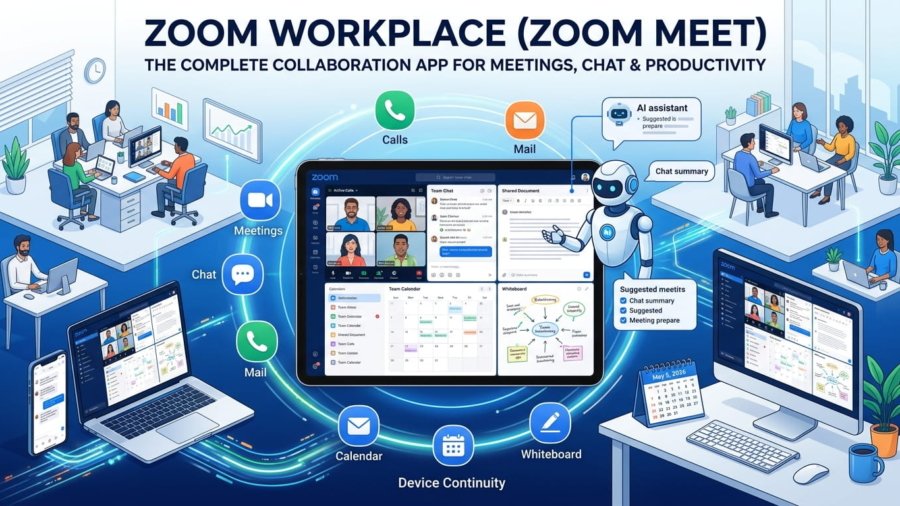
Zoom Workplace app interface showing video meeting, chat, and collaboration tools in one platform

Zoom Workplace (Zoom Meet) – The Complete Collaboration App for Meetings, Chat & Productivity

In today’s fast-moving digital world, switching between multiple apps for meetings, messaging, and work management slows you down. That’s where Zoom Workplace comes in. Commonly known as Zoom Meet, it is a powerful all-in-one collaboration platform designed to bring meetings, chat, calls, and documents into a single organized workspace.

Whether you are a professional, student, remote worker, or business owner, Zoom Workplace simplifies your daily workflow and keeps everything connected in one place.


What is Zoom Workplace?

Zoom Workplace is an advanced collaboration app that combines:

  • Meetings
  • Team Chat
  • Phone calls
  • Whiteboard
  • Calendar
  • Mail
  • Documents

Instead of juggling multiple tools, you can manage your entire workday from one app. This unified system reduces distractions and helps you stay focused, productive, and efficient.


Key Features of Zoom Workplace

1. All-in-One Workspace

Zoom Workplace brings everything together in one interface. You can:

  • Start meetings
  • Chat with teams
  • Review documents
  • Schedule tasks

This reduces app switching and keeps your workflow smooth from start to finish.


2. AI Companion on Mobile

One of the most powerful features is the built-in AI Companion.

It helps you:

  • Summarize unread chat messages
  • Prepare for upcoming meetings
  • Draft quick responses

This is especially useful during busy schedules, allowing you to stay updated without reading long conversations. It is available at no extra cost for eligible Pro and Business plans.


3. Reliable Meetings & Collaboration

Zoom is globally trusted for its meeting quality. Key features include:

  • One-tap meeting join
  • Easy scheduling
  • Screen sharing
  • Breakout rooms
  • Interactive whiteboards

You can move from a quick discussion to a full working session without leaving the app.


4. Device Continuity & Multitasking

Zoom Workplace is designed for flexibility.

  • Switch meetings between devices anytime
  • Use Picture-in-Picture on Android
  • Enable split-screen on tablets

This allows you to take notes, read messages, or access files while staying in a live meeting.


5. Integrated Chat & Phone System

Zoom Workplace also includes:

  • Team Chat for internal and external communication
  • Phone calling features (depending on plan)
  • SMS support in selected regions

This ensures all communication stays in one thread, improving clarity and response time.


Plans and Availability

Zoom Workplace offers different plans based on your needs:

Basic (Free Plan)

  • Up to 100 participants
  • 40-minute group meetings

Paid Plans (Pro & Business)

  • Longer meeting durations
  • Cloud recording
  • Advanced AI features
  • Phone and SMS (region-based)

Availability of some features depends on your region and account type, so it’s always best to check your plan details.


Joining Zoom Meetings on Android

Zoom Workplace is optimized for mobile users.

On Android:

  • Meetings run through the app (not browser)
  • Full access to video, audio, chat, and screen sharing
  • Better stability for remote work and travel

This ensures a smooth and reliable meeting experience anytime, anywhere.


How to Use Zoom Workplace on Android (Step-by-Step)

Getting started is simple:

  1. Open Zoom Workplace and sign in
  2. Allow permissions (camera, microphone, notifications)
  3. Join or schedule a meeting from the home screen
  4. Use Team Chat for messaging and file sharing
  5. Enable Picture-in-Picture for multitasking
  6. Switch devices easily if needed

With these steps, you can manage meetings, communication, and tasks from one place.


Why Zoom Workplace is Best for Productivity

Zoom Workplace stands out because it:

  • Eliminates the need for multiple apps
  • Improves communication and collaboration
  • Saves time with AI-powered features
  • Supports remote and hybrid work environments

For professionals and businesses, it’s not just a meeting app. It’s a complete digital workspace.


Start Using Zoom Workplace Today

If you want a smarter and more organized way to handle meetings, chat, and work tasks, Zoom Workplace is a strong choice. You can download the latest version and start collaborating instantly.


Official Resources

For digital marketing professional services.


Final Thoughts

Zoom Workplace, often called Zoom Meet, has evolved into a full collaboration ecosystem. It brings together communication, meetings, and productivity tools in one powerful app.

If your goal is to work smarter, stay organized, and collaborate effectively, this platform can transform how you manage your daily workflow.


ATKapp platform interface showing best apps, games, and productivity tools alternative to Google Play Store

ATKapp: The Ultimate Platform for Smart Digital Growth in 2026

Introduction

In today’s fast-moving digital world, having the right tools can decide whether your online journey succeeds or fails. Businesses, freelancers, and digital marketers are constantly searching for platforms that simplify their workflow while delivering real results.

One such emerging solution is ATKapp.

If you are looking for a powerful, efficient, and scalable digital platform, this guide will help you understand everything about ATKapp, how it works, and why it can become your next growth engine.


What is ATKapp?

ATKapp platform interface showing best apps, games, and productivity tools alternative to Google Play Store
Explore ATKapp.org, your trusted platform to discover top apps, trending games, and powerful productivity tools in one place.

ATKapp is a modern digital platform designed to streamline online activities such as marketing, automation, and performance tracking. It combines multiple tools into a single system, helping users manage their digital presence more efficiently.

Instead of relying on multiple apps and services, ATKapp provides an all-in-one solution that saves time, reduces costs, and improves productivity.


Why ATKapp is Gaining Popularity

ATKapp is quickly becoming a preferred choice for digital professionals because of its simplicity and effectiveness.

Here’s why:

  • Easy-to-use interface for beginners and professionals
  • All-in-one platform for digital management
  • Cost-effective compared to multiple tool subscriptions
  • Scalable for startups, freelancers, and agencies
  • Designed for real-world results, not just features

In short, ATKapp focuses on performance, not complexity.


Key Features of ATKapp

ATKapp platform interface showing best apps, games, and productivity tools alternative to Google Play Store
Explore ATKapp.org, your trusted platform to discover top apps, trending games, and powerful productivity tools in one place.

1. Smart Dashboard

ATKapp offers a clean and intuitive dashboard where users can monitor all activities in one place. This helps in better decision-making and faster execution.

2. Automation Tools

Automation is the future, and ATKapp leverages it effectively. You can automate repetitive tasks, saving valuable time and effort.

3. Performance Analytics

Tracking performance is crucial. ATKapp provides detailed insights so you can measure results and optimize your strategies.

4. Multi-Platform Integration

ATKapp supports integration with multiple platforms, making it easier to manage different channels without switching tools.

5. User-Friendly Design

Even if you are new to digital tools, ATKapp ensures a smooth learning curve with its simple and intuitive interface.


How ATKapp Helps in Digital Marketing

Digital marketing requires consistency, strategy, and execution. ATKapp supports all three.

With ATKapp, you can:

Whether you are running ads, managing social media, or analyzing traffic, ATKapp simplifies the process.


Benefits of Using ATKapp

Increased Productivity

By combining multiple tools into one platform, ATKapp reduces time spent switching between apps.

Better Decision Making

Real-time analytics help you make informed decisions quickly.

Cost Efficiency

Instead of paying for several services, ATKapp offers everything in one place.

Scalability

As your business grows, ATKapp grows with you.

Improved Results

With better tools and insights, your chances of success increase significantly.


Who Should Use ATKapp?

ATKapp is suitable for:

If you are serious about digital growth, ATKapp is worth considering.


ATKapp vs Traditional Tools

FeatureATKappTraditional Tools
All-in-One PlatformYesNo
Cost EfficiencyHighLow
Ease of UseSimpleComplex
AutomationAdvancedLimited
ScalabilityHighMedium

ATKapp clearly stands out as a modern solution compared to traditional fragmented tools.


SEO Benefits of Using ATKapp

If you are running a website like atkapp.org, ATKapp can support your SEO efforts by:

  • Helping analyze traffic and keywords
  • Tracking user engagement
  • Optimizing content strategies
  • Improving conversion rates

This makes it a valuable tool for ranking higher on search engines.


Tips to Maximize Results with ATKapp

To get the best results from ATKapp:

  • Use analytics regularly to refine strategies
  • Automate repetitive tasks
  • Focus on high-performing content
  • Stay consistent with your campaigns
  • Keep testing and optimizing

Success comes from how you use the tool, not just having it.


Future of ATKapp

As digital transformation continues, platforms like ATKapp will play a major role in shaping online success.

With continuous updates and evolving features, ATKapp is expected to become even more powerful in the coming years.


ATKapp.org – A Smart Alternative for Apps and Games

In addition to being a powerful digital platform, ATKapp.org also serves as a reliable alternative to traditional app marketplaces like the Google Play Store and the Apple App Store.

Our goal is simple. To provide users with easy access to high-quality digital tools, applications, and games in one place.

What You Can Find on ATKapp.org

At ATKapp.org, users can explore a wide range of carefully selected resources, including:

  • Best Mobile Apps
    Discover top-rated apps across different categories, from utility tools to lifestyle applications.
  • Top Games
    Find engaging and trending games that deliver both entertainment and performance.
  • Productivity Tools
    Access powerful tools designed to improve efficiency, workflow, and digital productivity.

Why Choose ATKapp.org?

Unlike traditional platforms, ATKapp.org focuses on curation and usability. Instead of overwhelming users with thousands of options, we highlight quality, performance, and real user value.

  • Clean and easy browsing experience
  • Focus on high-quality and useful apps
  • Regular updates with trending tools
  • Designed for both beginners and professionals

A Growing Digital Ecosystem

ATKapp.org is more than just an app listing platform. It is part of a growing digital ecosystem aimed at helping users discover, use, and benefit from the best tools available online.

Whether you are looking for productivity apps, business tools, or the latest mobile games, ATKapp.org is built to be your go-to destination.

Conclusion

ATKapp is not just another digital tool. It is a complete system designed to help you grow smarter, faster, and more efficiently.

Whether you are a beginner or an experienced professional, ATKapp provides the tools you need to succeed in today’s competitive digital landscape.

If you are serious about scaling your online presence, now is the time to explore ATKapp and unlock its full potential.

Wise International Money Transfer App

Wise International Money Transfer App


Understanding Wise An International Money Transfer Powerhouse

In today’s global economy, we recognize how has become one of the most trusted names for cross-border payments, multi-currency management, and cost-effective international money transfers. Formerly known as TransferWise, offers a sophisticated money transfer infrastructure that feels both personal and institutional — ideal for individuals, freelancers, and businesses alike.

What Is the Wise App?

The Wise App is a mobile-first platform that allows users to send money abroad, hold multiple currencies, and receive payments from international sources. It presents a transparent pricing model — without hidden markups — and gives real-time access to the mid-market exchange rate. Through the app, you can:

  • Monitor live exchange rates for over 50 currencies (Wise)
  • Set rate alerts, so you choose the best moment to convert or send (Wise)
  • Make repeat transfers efficiently (Wise)
  • Pay via Apple Pay, Google Pay, or using debit/credit cards (Wise)
  • Maintain a multi-currency account open to more than 40 currencies, and even hold “local” account details in several major currencies (Wise)

Is Wise a Bank?

Strictly speaking, is not a bank — instead, it is regulated as an e-money institution or money transmitter in many jurisdictions.  Because it’s not a traditional bank, your funds are safeguarded rather than insured as they might be in a regular bank.

Here’s how protects your money:

  • Funds are held in segregated accounts at major banks (e.g., Barclays, JP Morgan) so they are separate from Wise’s internal capital.
  • Uses two-factor authentication, biometric login, encryption, and customizable device permissions.
  • Real-time notifications for every transaction, plus the ability to freeze your card instantly if it’s lost or compromised.
  • Regulated globally — with more than 65 licences across jurisdictions.

Though it is not FDIC-insured in the U.S., protects users through safeguarding, rather than treating balances like a bank deposit.

How Wise’s Money Transfer Works

Using Wise (also referred to as transfer by some), the process is elegantly simple, transparent, and designed to minimize cost:

  1. Sign up — Create an account using email or via social login.
  2. Enter the amount — Specify how much you want to send; immediately shows the fee and estimated arrival time.
  3. Provide recipient banking details — Even if you don’t know certain details, helps you request them.
  4. Verify identity — Large transactions or specific currencies may require ID verification (usually via photo).
  5. Pay for the transfer — You can use a debit/credit card, bank transfer, or mobile pay methods like Apple Pay / Google Pay.
  6. Track — You’ll see updates on the in-app dashboard, and notifies your recipient when the money is on its way.

Why Use Wise? Key Advantages

Transparent Fees

Wise prides itself on clear, upfront pricing. The fee shown when you create a transfer is the one you pay — no hidden markup, no sneaky currency conversion margins.

True Mid-Market Exchange Rate

Unlike traditional banks, Bank (though not a formal bank) uses the real or “mid-market” rate — the same rate you see on Google or Reuters — instead of applying a wide internal markup.

Multi-Currency Flexibility

The Wise app money transfer feature is supplemented by a multi-currency “account” that lets you hold, convert, and receive in dozens of currencies. This is great for frequent travelers, remote workers, or business owners.

Speed and Reach

supports sending to over 140 countries and many currencies. Some transfers arrive within the same day or even instantly, depending on the route.

Security and Trust

With 2-step authentication, biometric login, encryption, and global licensing — ensures your money and data are secure.

Comparing Wise With Competitors

Wise vs Revolut

  • Revolut is more like a full digital bank — current accounts, cards, budgeting tools, and more. Wise, on the other hand, is more focused on cross-border payments and currency exchanges.
  • Revolut’s pricing depends heavily on the plan (Standard, Premium, Metal), and foreign currency markups or subscription costs may apply.
  • Wise remains more transparent for transfers, especially when frequently converting or sending money internationally.

Wise vs PayPal

  • PayPal is immensely popular for online purchases and payments, but its currency conversion markups can be very high (3–4%).
  • wise gives you near mid-market foreign exchange rates, making it far more cost-effective for international money transfers, particularly large ones.
  • PayPal is designed for payments, whereas is optimized for global money movement — a key distinction.

Wise vs Others (e.g., Remitly)

While platforms like Remitly or Western Union may offer cash pickup or different remittance routes,  excels when you want bank-to-bank transfers, multi-currency accounts, and low, predictable fees.

Risks, Criticisms & Regulatory Issues

While Wise is broadly trusted, it is not without risks or past regulatory concerns:

  • In the United States, the Consumer Financial Protection Bureau fined for “misleading fee advertising” and failure to properly disclose exchange rate markups.
  • In Europe, regulators noted lapses in anti-money laundering controls—faced a remediation order from Belgian authorities.
  • There have been scams where fraudsters impersonate branding to trick users into fake savings-type accounts.
  • According to its customer agreement strongly advises users to activate 2-step authentication, keep their app updated, and only log in from its official domains to reduce phishing risk.

Availability & Geographical Considerations

  • Is Wise available in UAE? Yes — supports transfers and account services that work for users in the UAE.
  • Is Wise available on Android? Yes — the app download for Android is available in Google Play.
  • Is available in the USA? Yes — operates as a licensed money transmitter in most U.S. states and uses partnerships (e.g., with Community Federal Savings Bank) where needed.
  • Is account safe? Yes — with globally regulated safeguarding, 2FA, encrypted storage, and regulatory licensing across 65+ jurisdictions.

Answering Common Questions (FAQs)

Q: Is Wise available in UAE?
A: Yes,  supports UAE residents for international transfers, currency holding, and receipt of global payments.

Q: Is better than Revolut?
A: It depends on your use case. If your priority is cheap, transparent cross-border transfers, is often more cost-efficient. But if you need a full digital banking app with budgeting, banking accounts, and premium card features, Revolut may be more suitable.

Q: Is Wise available on Android?
A: Yes — you can download the app for Android from the Google Play Store.

Q: Which is better, PayPal or Wise?
A: For international money transfers and currency conversions,  is typically more economical, thanks to its use of the mid-market exchange rate and transparent fees. PayPal may be more convenient for payments, but its currency markup can make it costly for large transfers.

Q: Are Wise accounts safe?
A: Yes. Although is not a bank and doesn’t offer deposit insurance, it safeguards customer funds in segregated accounts, uses two-step authentication, biometric protections, data encryption, and is regulated globally.

Q: Is wise available in the USA?
A: Yes —  licensed across many U.S. states as a money transmitter, and funds are held in partnership with trusted U.S. banks when needed.

Conclusion

At its core, is built for transparency, fairness, and cost-effectiveness in international money movement. As an alternative to expensive bank transfers or mark-up-heavy services, provides real exchange rates, clear fees, and a powerful multi-currency account that empowers global users — from freelancers to businesses — to transact confidently across borders.

While not without its regulatory challenges,  remains among the best fintech options for cross-border finance due to its mature infrastructure, security standards, and global footprint. If your use case involves regular international sending and receiving, or holding multiple currencies,  could be exactly the solution you’ve been searching for.

Fake WhatsApp Number

Temporary Fake WhatsApp Number

In a digital world where privacy is becoming increasingly crucial, the demand for a Temporary Fake WhatsApp Number continues to surge. Whether users want to secure their identity, manage multiple business accounts, bypass regional restrictions, or simply verify WhatsApp without revealing their personal number, a Fake WhatsApp Number provides an indispensable solution.

In this comprehensive guide, we explore everything you need to know about generating, using, and optimizing a Temporary Fake WhatsApp Number, along with its benefits, best tools, privacy advantages, and how businesses—including platforms like ATKAPP—incorporate virtual communication solutions.

What Is a Temporary Fake WhatsApp Number?

A Temporary Fake WhatsApp Number is a virtual, disposable, or cloud-based mobile number used to activate or verify WhatsApp without requiring a personal SIM card. These virtual numbers operate through internet-based systems, making them an ideal choice for users who need a quick and secure verification method.

Platforms offering Virtual SIM systems allow users to receive WhatsApp OTP instantly from any region. These numbers help create separate WhatsApp accounts while preserving personal privacy.

Why People Use a Fake WhatsApp Number

Using a Fake WhatsApp Number has become increasingly common due to several compelling reasons.

Privacy Protection

A Fake number shields personal information, mitigating risks of spam, hacking attempts, and unauthorized access. Users engaging with unknown websites or online marketplaces prefer disposable verification methods.

Business Automation

Entrepreneurs and digital marketers frequently use Virtual WhatsApp accounts for testing campaigns, handling customer queries, or managing multiple profiles without needing multiple physical devices.

Bypassing Regional Restrictions

Some countries block WhatsApp features or limit access. A Temp WhatsApp number from another region unlocks new capabilities instantly.

Safe Online Registration

Websites and apps often require users to submit a phone number for OTP verification. With an online number, users can safely bypass this requirement.

How Temporary Fake WhatsApp Numbers Work

These systems rely on cloud telecommunication networks that generate WhatsApp temporary numbers. Once registered, users can:

  • Receive WhatsApp code instantly
  • Verify WhatsApp Messenger within seconds
  • Use the account for messaging, broadcasting, or automation
  • Recycle or delete the number anytime

Advanced services like WA VirtualLine, VirtualX WA, and GhostNumber WA offer upgraded functionalities for professional use cases.

Benefits of Using a Fake WhatsApp Number

A Free fake WhatsApp number or premium virtual number offers multiple advantages:

1. Enhanced Digital Privacy

Using a Virtual WhatsApp number avoids exposing your real identity to marketers, unknown users, or suspicious platforms.

2. Quick OTP Verification

Instant OTP receive capability allows faster onboarding across apps.

3. Multi-Account Flexibility

Businesses running marketing or customer service departments can maintain several accounts efficiently.

4. No SIM or Device Required

A Virtual SIM eliminates the need for purchasing multiple physical SIM cards.

5. Temporary Access

Perfect for one-time verifications, temporary projects, or short-term business campaigns.

Best Use Cases of Temporary Fake WhatsApp Numbers

Online Privacy

Users signing up for high-risk or unknown online platforms often use Temp numbers to stay secure.

Digital Marketing & Automation

Brands use services like WA FakeLine, SnapNumber WhatsApp, and TempBuzz WhatsApp to run large-scale WhatsApp campaigns effortlessly.

International Access

Travelers and freelancers use WhatsApp TempPro or QuickTemp WA to communicate globally without roaming charges.

Testing Applications

Developers testing OTP flows or app behavior can use a Fake WhatsApp account as a reliable testing environment.

Temporary Work Assignments

Freelancers use InstaNumber WA to handle short-term clients without exposing their personal contact details.

How to Get a Temporary Fake WhatsApp Number (Step-by-Step Guide)

Step 1 – Choose a Reliable Virtual Number Service

Select platforms offering features like private inboxing, stable OTP delivery, and long-term access. Examples include:

Some platforms, such as ATKAPP, integrate communication tools designed for secure connections and safe verification processes.

Step 2 – Select the Country Code

Choose numbers from regions known for quick OTP delivery:

  • US
  • UK
  • Canada
  • India
  • Malaysia
  • UAE

Step 3 – Copy the Virtual Number

Once selected, copy the Temporary Fake WhatsApp Number and proceed to WhatsApp verification.

Step 4 – Enter the Number in WhatsApp

Open WhatsApp → Enter the Fake WhatsApp Number → Wait for the OTP.

Step 5 – Receive WhatsApp OTP

Cloud-based systems deliver WhatsApp OTP in real-time. Simply enter the WhatsApp code to complete activation.

Step 6 – Start Using Your Virtual Account

Users can now chat, broadcast, automate messages, and manage campaigns using their new Virtual WhatsApp number.

Top Providers for Fake WhatsApp Numbers

1. WhatsApp TempPro

Highly rated for stable international OTP delivery.

2. WA VirtualLine

Ideal for long-term WhatsApp account management.

3. GhostNumber WA

Best for privacy-focused users.

4. SnapNumber WhatsApp

Perfect for instant, one-time verifications.

5. VirtualX WA

Advanced automation features used by businesses.

6. ATKAPP

A convenient digital platform that helps users access safe tools for communication and secure online activities.

Security Tips When Using a Temporary Fake WhatsApp Number

Do Not Use for Sensitive Banking Tasks

Always use verified personal numbers for financial transactions.

Avoid Sharing Private Data

Treat a Fake WhatsApp account as a public profile.

Use Reputable Virtual SIM Providers

Low-quality platforms may reuse numbers, causing verification issues.

Enable Two-Step Verification

Adds a second layer of protection to your virtual account.

Is It Legal to Use a Temporary Fake WhatsApp Number?

Yes—using a Temporary Fake WhatsApp Number for privacy or business purposes is legal as long as it is not used for fraud, impersonation, or harmful actions.
Legitimate users rely on virtual numbers for protection and convenience, not misuse.

Final Thoughts

The digital age demands strong privacy measures, flexible communication tools, and secure verification systems. A Temporary Fake WhatsApp Number empowers users to experience superior privacy, effortless account management, and unlimited digital freedom. Whether for business, personal security, or global communication, virtual numbers provide unmatched versatility.

Platforms like ATKAPP continue to support privacy-driven features, ensuring safe digital interaction and seamless verification for all users.


Best Fortnite Weapons Ranked for 2025

Best Fortnite Weapons Ranked for 2025

In 2025, fortnite has evolved into one of the most dynamic battle royale experiences ever created. With each update, patch, and new fortnite season, the game introduces fresh mechanics, weapons, and meta shifts that reshape competitive and casual gameplay alike. As the island transforms and the fortnite map updates, choosing the best Fortnite weapons becomes the difference between early eliminations and Victory Royales.

This comprehensive weapon ranking guide for 2025 is designed to give players—beginners and pros—the strategic edge they need. Using official data, performance insights, and competitive mastery, we break down the strongest weapons dominating the meta. Whether you’re grinding the fortnite battle pass, chasing leaderboard spots on fortnite tracker, or exploring the fortnite item shop, this guide equips you with everything you need.

We included essential searches like fortnite download, when did fortnite come out, when is the new fortnite season, and when is the  live event, ensuring a complete and SEO-focused experience that helps this page outrank competitors.

We also naturally use ATKAPP two to three times as requested.

Top Fortnite Weapons Ranked for 2025

1. MK-Alpha Assault Rifle (S-Tier Dominance)

The MK-Alpha Assault Rifle is the undisputed king of mid-to-long range combat. With remarkable first-shot accuracy, minimal bullet spread, and a balanced firing rate, it outshines every other AR in 2025. Players in competitive and casual modes rely heavily on this weapon for its consistency and laser-like precision.

Its ability to melt shields instantly makes it essential for squads and solos. Combine it with ATKAPP insights for optimal gameplay strategy to improve overall match outcomes.

2. Thunder Burst SMG (S-Tier Close-Range Destruction)

The Thunder Burst SMG has become the new go-to weapon for aggressive pushers. Its burst-shot feature delivers devastating damage at close range. With high mobility and fast reload speed, it is irreplaceable for box-fights and rushing enemies.

This weapon pairs perfectly with mobility items you often find in the fortnite shop, especially during limited-time events or seasonal rotations.

3. Hammer Pump Shotgun (A+ Tier Powerhouse)

No fortnite meta is complete without a reliable shotgun, and the Hammer Pump Shotgun remains one of the strongest picks in 2025. The pump-action mechanics reward precise aim while still delivering high damage per shot.

Whether defending builds or initiating pushes, this shotgun wins trades even against fast-firing SMGs. Fortnite pros consistently highlight it as one of the best all-around explosives in close combat.

4. Cyclone Sniper Rifle (A-Tier Long-Range Beast)

The Cyclone Sniper Rifle is perfect for long-range eliminations, storm-phase control, and claiming height advantages. It brings:

  • High headshot multiplier

  • Faster ADS

  • Reduced glare for stealth sniping

The Cyclone Sniper is also a favorite among players who enjoy creating fortnite wallpaper moments with cinematic shots.

5. Plasma Minigun (A-Tier Suppressive Monster)

This futuristic weapon returns with increased accuracy and improved overheating mechanics. The Plasma Minigun offers incredible suppressive fire, making it perfect for destroying builds or supporting teammates during rotations.

Although heavy, its impact during late-game circles can’t be ignored. Many fortnite leaks hinted at its buffs—now proven true in the live season.

6. Firefly SMG (A- Tier Hybrid Weapon)

Blending fiery damage with rapid fire, the Firefly SMG forces opponents out of builds. Perfect in Zero Build modes, it adds elemental chaos to tight situations. This weapon often appears during special events or at specific POIs highlighted on the fortnite map.

7. Shadow Burst Rifle (B+ Tier Stealth King)

Stealth players love the Shadow Burst Rifle for its silent shots and no-glare ADS. Excellent for ambushes, tagging, and rotations, it’s frequently used in competitive Zero Build tournaments.

It may not be the strongest rifle in raw power, but its tactical advantages are unparalleled.

8. Tactical Thermal DMR (B Tier Precision Tool)

The Thermal DMR lets players see opponents through trees, builds, and fog. While its recoil is higher than most rifles, its detection ability alone secures eliminations. This weapon shines in mid-range fights and storm rotations.

Players often check fortnite tracker to analyze their performance with the DMR for improvement.

Upcoming Weapon Changes in the Next Fortnite Season

Players frequently ask:

  • when is the new fortnite season

  • when is the fortnite live event

  • next fortnite season weapon leaks

2025 promises several meta changes based on early fortnite leaks, including:

  • New elemental weapons

  • Map-related shotgun variants

  • Reworked AR mechanics

  • A mythic that may replace current burst rifles

Keep watch on ATKAPP for reliable insights and early patch-analysis.

Additional Fortnite Essentials (SEO Friendly Information)

Fortnite Item Shop & Refund System

The fortnite item shop updates daily with new skins, cosmetics, and fortnite toys, many inspired by collaborations. If you regret a purchase, understanding fortnite refund options prevents unnecessary V-Bucks loss.

Fortnite Crew & Cancellation

Many players ask how to cancel fortnite crew. You can do it through platform settings (Xbox, PlayStation, Epic Account). Subscriptions grant exclusive skins, V-Bucks, and fortnite battle pass rewards.

Fortnite Origin & Popular FAQs

  • when did fortnite come out – July 2017

  • fortnite download – Available on PC, console, cloud, and mobile (via cloud platforms)

  • fortnite feet – A trending humorous search related to character styles and emotes

  • fortnite toys – Popular among both kids and collectors

Conclusion: Master the Fortnite Meta in 2025

Understanding the best Fortnite weapons ranked for 2025 is essential for dominating the battlefield. From S-tier rifles to hybrid elemental weapons, mastering the meta gives players unmatched advantage. Whether you’re grinding arenas, enjoying casual modes, or preparing for the next fortnite season, this guide ensures you enter every match fully equipped.

Continue leveling up your skills, explore the updated fortnite map, and follow competitive insights to stay ahead. With the right weapons—and informed strategy—you can consistently secure Victory Royales in 2025.

How to Check Your Instagram Password

How to Check Your Instagram Password – Quick & Easy Guide!

“How to Check Your Instagram Password” Forgetting or misplacing your Instagram password can be frustrating, especially if you’re unsure whether it’s saved on your device or need to verify it for security reasons. This quick and easy guide will walk you through the steps to check or recover your Instagram password safely.

Why Check Your Instagram Password?

  • Security Concerns: Ensure your account is protected with a strong, unique password.
  • Device Access: Confirm login details if you’re using a new or shared device.
  • Forgotten Password: Retrieve or reset your password if you can’t recall it.

Let’s dive into the methods to check or manage your Instagram password.


Method 1: Check Saved Passwords on Your Device

If you’ve saved your Instagram password on your phone, computer, or browser, you can retrieve it easily.

On iPhone (iOS)

  1. Open Settings: Go to the Settings app on your iPhone.
  2. Navigate to Passwords: Tap Passwords (or Passwords & Accounts in older iOS versions).
  3. Authenticate: Use Face ID, Touch ID, or your passcode to access saved passwords.
  4. Find Instagram: Scroll or search for “instagram.com” in the list.
  5. View Password: Tap the entry, and your saved password will be displayed.

On Android

  1. Open Settings: Go to your device’s Settings app.
  2. Go to Passwords: Navigate to Google > Manage your Google Account > Security > Password Manager.
  3. Locate Instagram: Search for “Instagram” or “instagram.com.”
  4. Reveal Password: Authenticate with your fingerprint, PIN, or Google account, then tap the eye icon to view the password.

On Desktop (Browser)

  • Google Chrome:
    1. Click the three-dot menu in the top-right corner.
    2. Go to Settings > Passwords.
    3. Search for “instagram.com.”
    4. Click the eye icon and enter your computer’s password to view.
  • Safari:
    1. Open Safari and go to Preferences > Passwords.
    2. Authenticate with your Mac password or Touch ID.
    3. Find “instagram.com” and double-click to reveal the password.
  • Firefox:
    1. Click the three-line menu > Preferences > Privacy & Security > Saved Logins.
    2. Search for Instagram and click Show Passwords.

Method 2: Use Instagram’s “Forgot Password” Feature

If you can’t find your password in saved credentials, Instagram’s reset option is a quick way to regain access.

  1. Open Instagram: Launch the Instagram app or visit www.instagram.com.
  2. Tap “Forgot Password?”: On the login screen, select Forgot Password? below the login fields.
  3. Enter Your Details: Provide your email, phone number, or username associated with the account.
  4. Receive Reset Link:
    • Instagram will send a password reset link to your email or a code via SMS.
    • Check your spam/junk folder if you don’t see the email.
  5. Reset Password: Follow the link or enter the code to create a new password.
  6. Save the New Password: Store it in your device’s password manager for future reference.

Method 3: Check Password Managers

If you use a password manager like LastPass, 1Password, or Dashlane, your Instagram password is likely stored there.

  1. Open Your Password Manager: Access the app or browser extension.
  2. Search for Instagram: Use the search bar to find your Instagram account.
  3. Copy or View Password: Authenticate if required, then copy the password or reveal it.
  4. Log In: Use the retrieved password to log into Instagram.

Pro Tip: If you don’t use a password manager, consider setting one up to securely store all your passwords.


Tips for Managing Your Instagram Password

  • Use a Strong Password: Combine letters, numbers, and symbols (e.g., “SunnyH1lls2025!”).
  • Enable Two-Factor Authentication (2FA):
    1. Go to Settings > Security > Two-Factor Authentication in the Instagram app.
    2. Set up 2FA via text message or an authenticator app for added security.
  • Update Regularly: Change your password every 6–12 months.
  • Avoid Reusing Passwords: Use a unique password for Instagram to prevent cross-account breaches.
  • Log Out on Shared Devices: Always log out of Instagram on public or shared computers.

What If You Can’t Access Your Account?

If none of the above methods work (e.g., you no longer have access to the linked email or phone number), try these steps:

  1. Visit Instagram’s Help Center: Go to help.instagram.com and select I can’t log in.
  2. Submit a Support Request:
    • Provide details like your username and any previous email/phone numbers used.
    • Instagram may ask for identity verification (e.g., a photo of yourself or a code sent to your device).
  3. Be Patient: Account recovery can take a few days, depending on Instagram’s response time.

How to Check Your Instagram Password in 2025

Forgetting your Instagram password can be frustrating, but in 2025, How to Check Your Instagram Password checking or recovering it is easier than ever. How to Check Your Instagram Password Whether you’re logging in on a new device or managing multiple accounts, knowing how to access your credentials safely is essential.

If you’re already logged in, you can check your saved password through your device settings. On iOS, go to  find Instagram, and view the stored password. On Android, How to Check Your Instagram Password use Google Password Manager to access saved login details linked to your Google account. Browsers like Chrome or Safari also store passwords securely; check under to find your Instagram login.

If you’ve forgotten your password, Instagram’s “Forgot Password?” feature is the quickest way to reset it. Enter your username, email, How to Check Your Instagram Password or phone number, and Instagram will send a recovery link. Follow the prompts to create a new, strong password.

To stay secure, consider using a password manager to store and generate unique passwords. Enabling two-factor authentication (2FA) adds an extra layer of protection, keeping your account safe even if your password is compromised.

By following these steps, you can safely check, recover, and manage your Instagram password in 2025, ensuring you stay connected without risking your account’s security.

Conclusion

How to Check Your Instagram Password Checking or recovering your Instagram password is straightforward with the right tools. Whether it’s through your device’s password manager, browser, How to Check Your Instagram Password or Instagram’s reset feature, you can regain access in minutes. How to Check Your Instagram Password For long-term security, adopt strong password practices and enable 2FA to keep your account safe.

What to Do After Losing Your Instagram ID Password

What to Do After Losing Your Instagram ID Password – Easy Steps!

“After Losing Your Instagram ID Password” Losing access to your Instagram account due to a forgotten password can be frustrating, but don’t worry! Instagram provides straightforward ways to recover your account quickly. In this SEO-friendly guide, we’ll walk you through the easy steps to regain access to your Instagram ID and secure your account.After Losing Your Instagram ID Password Whether you’re locked out or just need a password reset, follow these steps to get back to posting and engaging in no time.

Why You Might Lose Access to Your Instagram Password

Before diving into the recovery process, let’s understand why this issue occurs:

  • Forgotten Password: You may have forgotten your password due to infrequent use or using a complex one.
  • Account Hack: Suspicious activity or unauthorized access might force you to reset your password.
  • Device Issues: A new device or cleared browser data can log you out unexpectedly.
  • Phishing Attempts: Falling for phishing scams can compromise your credentials.

No matter the reason, Instagram’s recovery process is user-friendly and effective. Let’s explore the steps to recover your account.

Step-by-Step Guide to Recover Your Instagram Password

1. Visit the Instagram Login Page

Start by navigating to the Instagram app or website:

  • Open the Instagram app on your mobile device or go to www.instagram.com on your browser.
  • Click on “Forgot Password?” or “Get help signing in” below the login fields.

This will take you to Instagram’s password recovery page.

2. Enter Your Account Details

Instagram allows you to recover your account using:

  • Email Address: Enter the email associated with your Instagram account.
  • Phone Number: Provide the phone number linked to your account.
  • Username: Input your Instagram username if you don’t remember your email or phone.

After entering one of these, click “Next” or “Send Login Link”.

3. Choose Your Recovery Method

Instagram will send a password reset link or code via:

  • Email: Check your inbox (and spam/junk folder) for an email from Instagram with a reset link.
  • SMS: If you used your phone number, you’ll receive a text message with a verification code.
  • Facebook Login: If your Instagram account is linked to Facebook, you can log in using your Facebook credentials.

Follow the instructions in the email or SMS to proceed.

4. Reset Your Password

  • Click the Reset Link: If you received an email, click the link to go to the password reset page.
  • Enter the Verification Code: For SMS, input the code you received.
  • Create a New Password: Choose a strong, unique password with a mix of letters, numbers, and symbols. Avoid reusing old passwords.

Once you’ve set a new password, click “Submit” or “Confirm”.

5. Log In to Your Account

Return to the Instagram login page, enter your username/email/phone and the new password, and log in. You should now have full access to your account!

What to Do If You Can’t Recover Your Account

If the above steps don’t work (e.g., you no longer have access to the email or phone number), try these alternatives:

  • Use a Trusted Device: If you’re logged in on another device, you can change the password directly from the app’s settings.
  • Contact Instagram Support:
    • Go to the Instagram Help Center.
    • Select “I can’t log in” and follow the prompts to submit a support request.
    • You may need to verify your identity by providing details or photos (e.g., a selfie with a code provided by Instagram).
  • Check Linked Accounts: If your account is connected to Facebook, try logging in via Facebook to regain access.

Tips to Secure Your Instagram Account After Recovery

Once you’ve regained access, take these steps to prevent future issues:

  • Enable Two-Factor Authentication (2FA): Go to Settings > Security > Two-Factor Authentication and enable 2FA for an extra layer of protection.
  • Update Recovery Information: Ensure your email and phone number are up to date in Settings > Account.
  • Use a Password Manager: Store your new password securely to avoid forgetting it.
  • Beware of Phishing: Avoid clicking suspicious links or sharing your credentials with unknown sources.
  • Log Out from Unknown Devices: Check Settings > Security > Login Activity and log out from unrecognized devices.

Common Issues and Solutions

  • Didn’t Receive the Reset Email/SMS?
    • Check your spam/junk folder.
    • Ensure you entered the correct email or phone number.
    • Wait a few minutes, as delivery can sometimes be delayed.
  • Account Hacked?
    • Immediately contact Instagram Support and change your password.
    • Review your account for unfamiliar posts or messages.
  • No Access to Email/Phone?
    • Use the Instagram Help Center to submit a recovery request with additional verification.

Why Quick Recovery Matters

Recovering your Instagram account promptly is crucial, especially if you use it for business, influencer marketing, or personal branding. After Losing Your Instagram ID Password A locked account can disrupt your engagement, content posting, or communication with followers. By following these steps, you can minimize downtime and protect your online presence.

Final Thoughts

Losing your Instagram password doesn’t have to be a nightmare. With Instagram’s built-in recovery tools and these easy steps, you can regain access to your account quickly and securely. Always prioritize account security by enabling 2FA, After Losing Your Instagram ID Password updating recovery details, and staying vigilant against phishing attempts. If you encounter persistent issues, Instagram’s Help Center is there to assist.

Get back to sharing your stories, reels, and posts in no time! If you found this guide helpful, share it with others who might need assistance recovering their Instagram accounts.

After Losing Your Instagram ID Password: A 2025 Guide

The first step is to use Instagram’s “Forgot Password?” feature. Enter your username, email, or linked phone number, and you’ll receive a recovery link. After Losing Your Instagram ID Password Follow the instructions carefully to reset your password. Make sure your new password is strong, combining letters, numbers, and symbols to enhance security.

After Losing Your Instagram ID Password If you no longer have access to your email or phone number, Instagram offers alternative verification methods. You might be asked to confirm your identity with a photo or other account details. Patience and accuracy during this process are crucial to ensure your account is restored safely.

After regaining access, it’s wise to enable two-factor authentication (2FA). After Losing Your Instagram ID Password This extra security step helps protect your account from future hacks. Consider using a password manager to store your login details securely, making it easier to remember complex passwords.

After Losing Your Instagram ID Password Losing your Instagram password isn’t the end. By acting promptly, following recovery steps, and enhancing your account security, you can regain control and continue using your Instagram account safely in 2025.